Gruppendynamiken mit intelligentem Routing skalieren
Nahtlose Erkundung
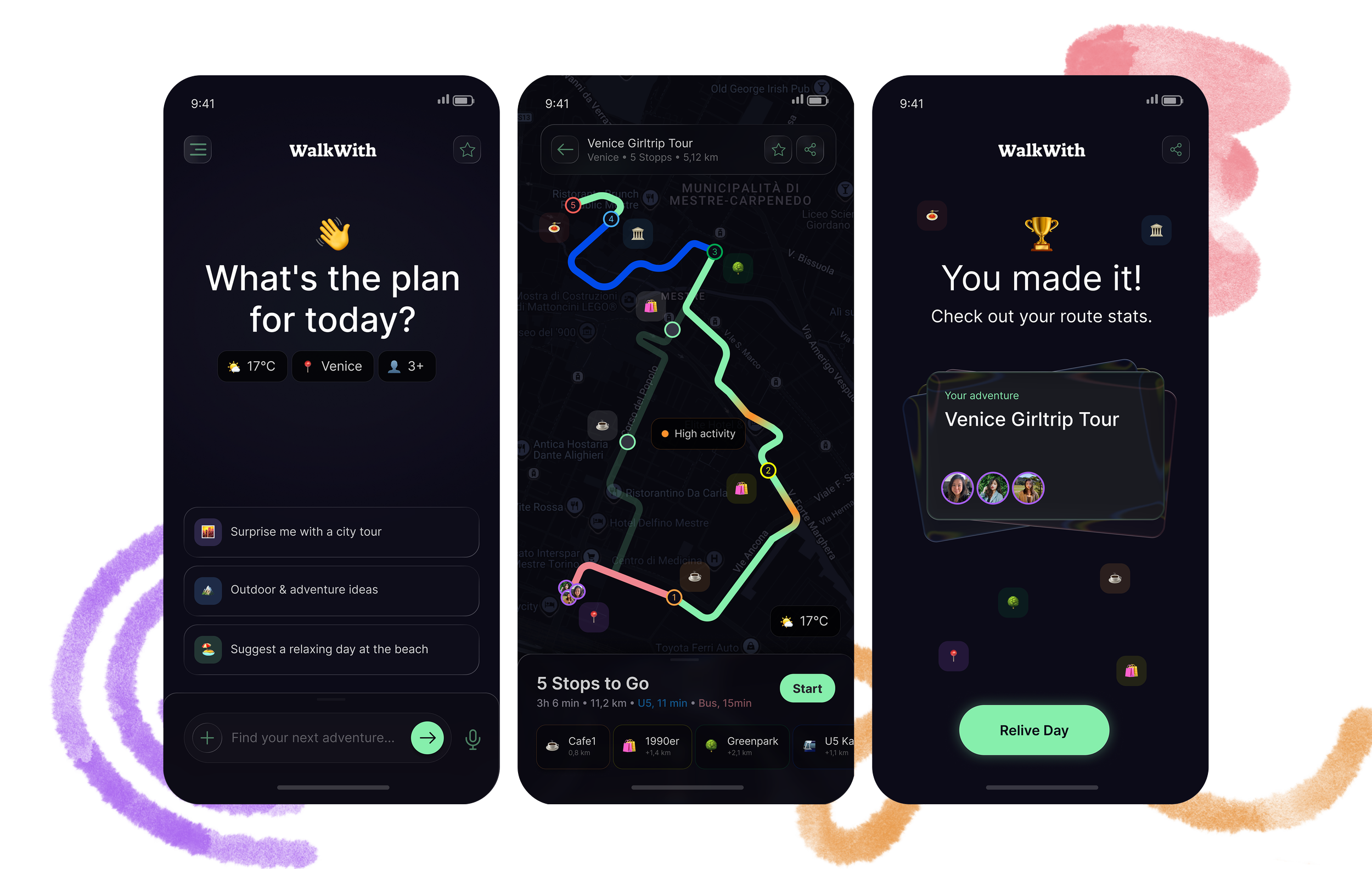
Der Ausgangspunkt

Ich reise gerne, aber ich kann keine Karten lesen. Jahrelang habe ich andere navigieren lassen und mich dafür schuldig gefühlt. Als ich auf Audio-Navigation umstieg, veränderte sich etwas: Ich hörte auf, auf mein Handy zu starren, und fing an, wirklich wahrzunehmen, wo ich war.
Der eigentliche Test: eine Überraschungsreise mit meinen zwei Schwestern. Eine Vegetarierin, eine auf Audio angewiesen, eine mit einer unsortierten Ideenliste. Drei Menschen, drei Rollen, ein Plan, der halten musste.
Ich verlor mich so sehr in der Logistik, dass ich fast vergaß, warum wir fuhren. Danach rekonstruierte ich die Reise aus Reels, die jemand anderes gepostet hatte.
Jedes Feature in WalkWith entstand aus einem Moment, in dem etwas nicht funktioniert hat. Das ist diese Geschichte.

Das Problem
Zu viele Optionen lähmen, noch bevor die Reise beginnt. Selbst der beste Plan bricht zusammen, sobald die Realität zuschlägt: Leerer Akku, keine Powerbank, Handys werden herumgereicht. Keine echten Lösungen.
In jeder Gruppe trägt am Ende eine Person alle Entscheidungen. Sie verfolgt die Route, vermittelt, organisiert, während alle anderen einfach mitlaufen. Diese Person genießt die Reise nicht. Sie verwaltet sie.

Toter Navigator, verlorene Gruppe

Viele Meinungen, keine Entscheidung

Augen unten, Erlebnis verpasst
Stunden geplant, ein Regen ruiniert alles
Die Erkenntnis
Die meisten Navigations-Apps lösen das falsche Problem. Sie bringen dich von A nach B, berücksichtigen aber nicht, dass die größte Reibung in einer Gruppe nicht geografischer Natur ist. Sie ist sozialer Natur.
WalkWith basiert auf einer anderen Prämisse: Nahtlose Erkundung erfordert, Menschen zu koordinieren, nicht nur Wege. Und das beste Navigationserlebnis ist eines, bei dem der Navigator kaum auf sein Handy schauen muss.
Partner-Integrationen wie NeoTaste folgen dieser Logik. Eine Empfehlung, die erscheint, weil deine Gruppe gerade ein vegetarisches Restaurant braucht, ist keine Werbung. Das ist die App, die ihren Job macht.
Meine Rolle
Selbst initiiertes Konzeptprojekt. Informelle Usability-Walkthroughs mit Freunden in Solo- und Gruppenreise-Kontexten. KI wurde gezielt eingesetzt: Als erster visueller Entwurf bei komplexen Screens und für Szenario-Simulationen. Jeden Screen, bei dem emotionales Design oder Accessibility-Hierarchie im Mittelpunkt stand, habe ich von Grund auf selbst gestaltet.
💡
Strategie & Systemdesign
🛠️
High-Fidelity UI & Prototyping
⚙️
KI-Orchestrierung
Das System
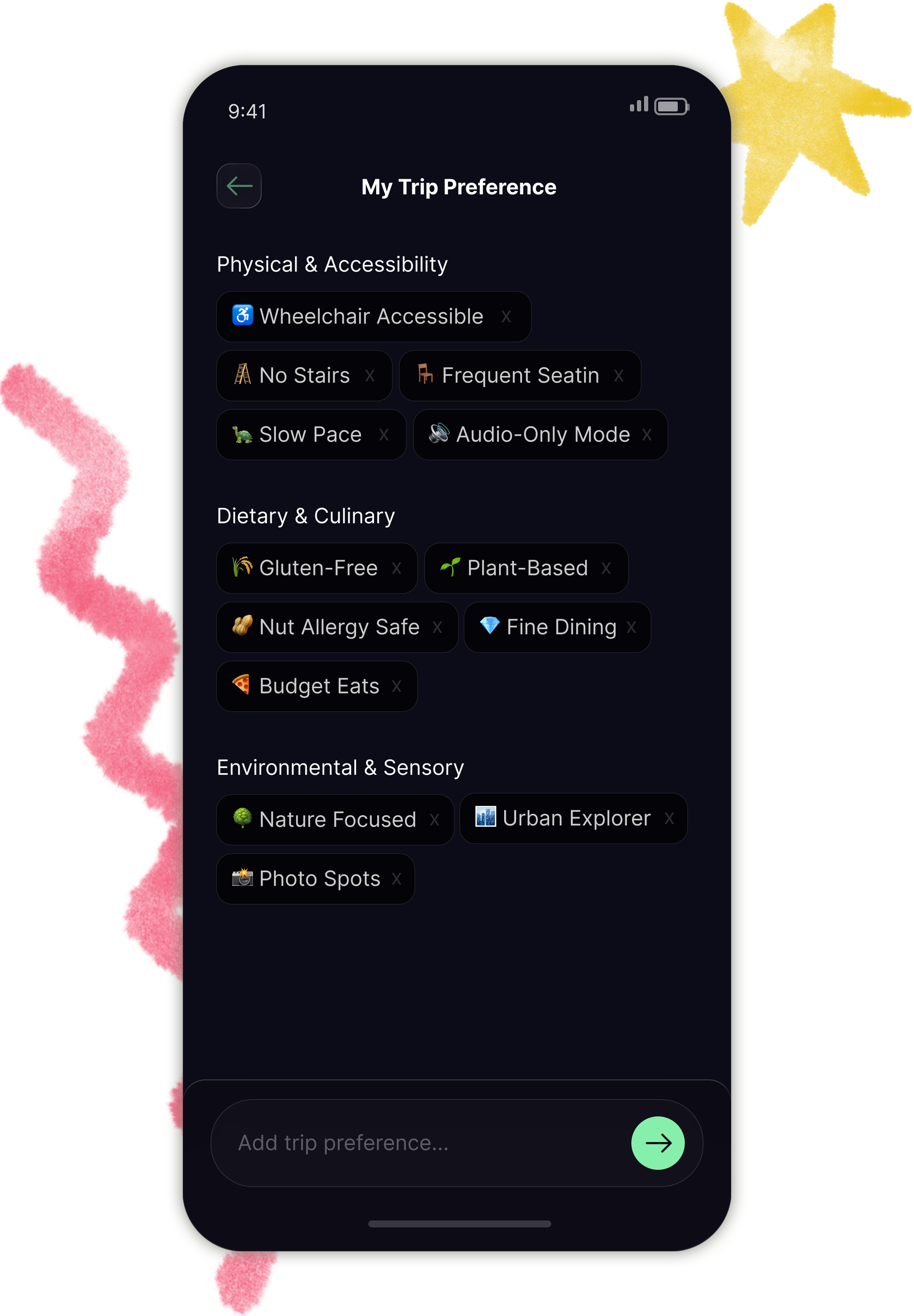
Phase A • Profiling & Smart Logic
Meine Schwester ist Vegetarierin. Jedes Mal, wenn wir einen Ort zum Essen suchten, musste jemand daran denken, es zu erwähnen. Manchmal wurde es vergessen.
Statt einem Präferenz-Formular habe ich ein Tagging-System entwickelt, das harte Ausschlüsse von weichen Interessen trennt.
Harte Ausschlüsse ändern sich nicht: z.B. Rollstuhlgerechtigkeit.
Weiche Interessen sind kontextuell: In Japan nutzt du den Nahverkehr, in einer kleinen Stadt gehst du lieber zu Fuß. Die Tags passen sich dem Kontext an.
Diese Präferenzen wirken wie globale Variablen. Wenn meine Schwester der Gruppe beitritt, ist ihre Präferenz bereits Teil der Logik. Niemand muss es erwähnen.
Battery Handoff: Fällt der Akku des Admins unter 15%, erhält der Co-Admin eine Benachrichtigung und wird automatisch zum Hauptnavigator. Die gesamte Gruppe sieht den Wechsel. Der Co-Admin wird vor der Reise festgelegt oder spontan während der Reise gewechselt.
Diese Rolle existiert, weil ein automatischer Wechsel zur Person mit dem höchsten Akkustand ein anderes Problem schafft: Plötzlich hat die falsche Person die Verantwortung.
Jemand, der nicht navigieren möchte oder gerade nicht aufpasst, sollte nicht versehentlich zum Navigator der Gruppe werden. Der Co-Admin ist eine bewusste, im Voraus getroffene Entscheidung.
Sowohl Admin als auch Co-Admin können die Route ändern und Abstimmungen initiieren. Andere Gruppenmitglieder können Ortsvorschläge einreichen, die Route jedoch nicht direkt ändern. Alle können passiv mitverfolgen.
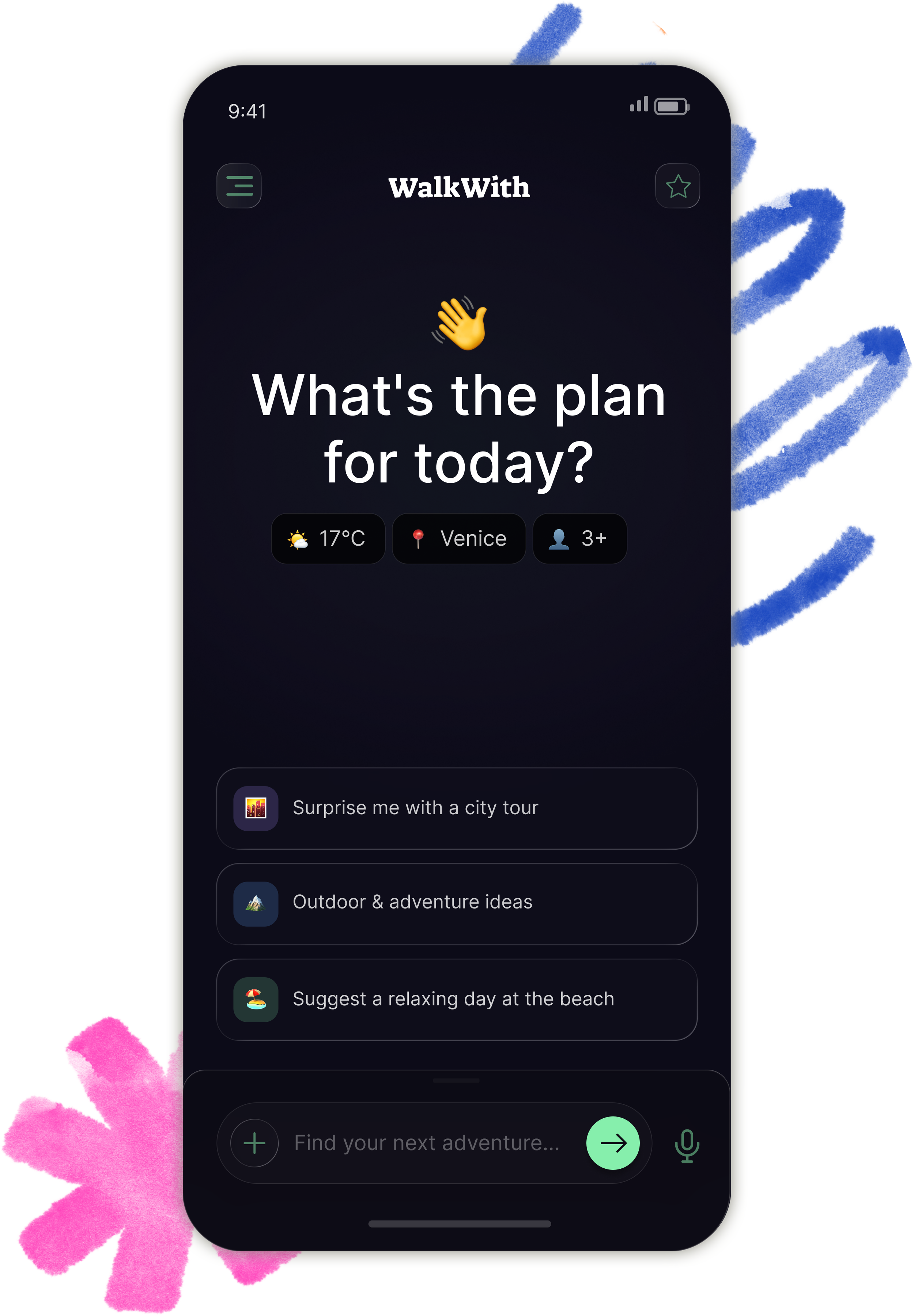
Phase B • The Planning Engine
Einen Trip für drei Menschen mit unterschiedlichen Präferenzen zu planen bedeutete stundenlange Recherche, noch bevor wir überhaupt aufgebrochen waren. Als wir einen Plan hatten, waren wir bereits erschöpft.
Der Mood Mixer bietet drei KI-vorbereitete Routen als Einstiegspunkt, statt einem offenen Suchfeld. Das NLP-Interface nimmt Texteingaben oder Sprache entgegen. Das System wendet die gespeicherten Präferenzen aller Gruppenmitglieder automatisch an und generiert eine optimierte Route.
Der Vorschlag ist nicht fix. Die Gruppe kann in die Karte hineinzoomen, Empfehlungen entlang der Route sehen und Stopps vor dem Losgehen anpassen. Partner-Empfehlungen über NeoTaste erscheinen als direkte Antwort auf geäußerte Präferenzen. Der Vorschlag taucht als Lösung auf, nicht als Unterbrechung.
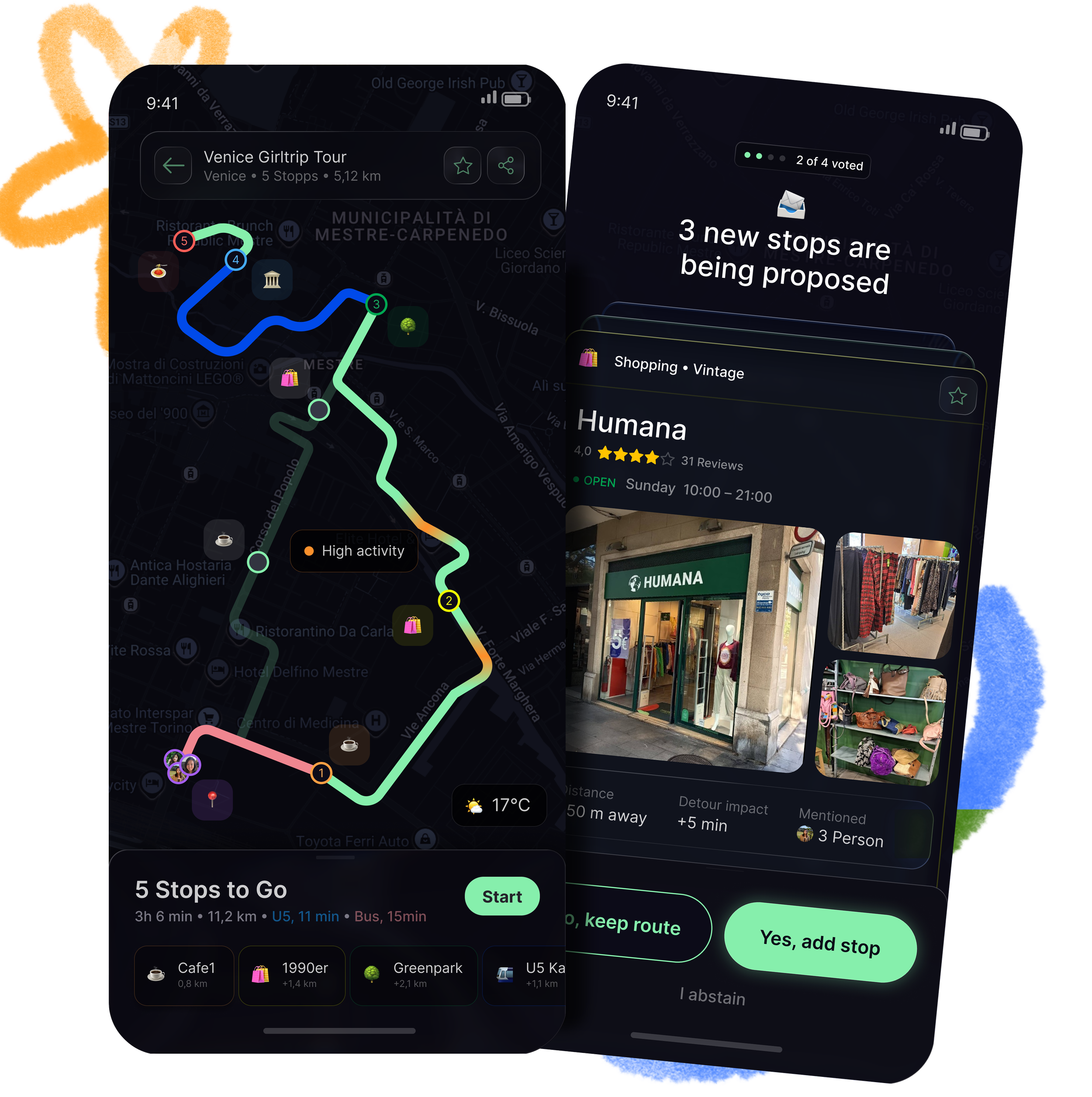
Phase C • Active Experience
This is where plans meet reality. And reality always wins.
In Japan, my feet gave out after hours of walking between stops. I didn't want to rebuild the entire route. I just wanted to take the train for the next leg and keep going. That moment became the Transit-Pivot.
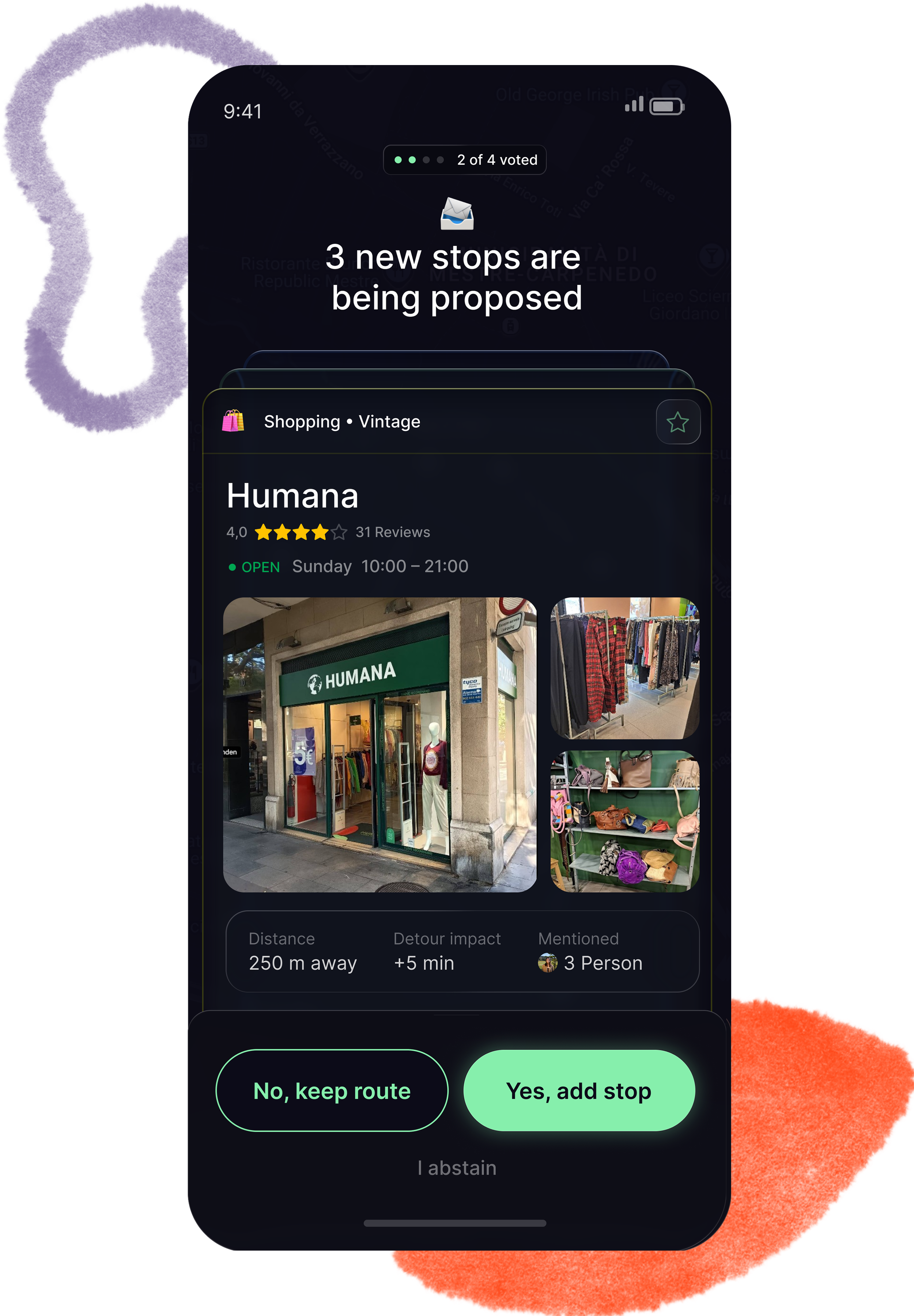
In a group of ten people, someone always has a strong opinion about where to go next. And whoever speaks loudest usually wins, not whoever has the best idea. That became Anonymous Voting.
And every time I navigated for a group, I was the one staring at my phone while everyone else was looking at the city. That became the Eyes-Up principle behind the entire Route Guide UI.
Anonymous Voting: When the group wants to change direction, proposals appear as swipeable cards without revealing who suggested them. The Tinder-style format came from a specific realization: In a large group, there are always at least two or three competing ideas at the same time. A single-card layout would hide that. The swipeable format makes the volume visible and the decision fast.
Only Admin and Co-Admin can send route changes or initiate a vote. Other group members can submit a location idea, which enters the voting pool. Everyone can follow passively.
Transit-Pivot: The connections between stops are interactive. One tap switches between walking and public transit. Arrival times update for the entire group in the background, without restarting navigation. The route doesn't collapse. The group keeps moving.
Eyes-Up Navigation: Secondary information like weather sits bottom right, not center screen. The hierarchy is built for motion: Readable in under two seconds, in poor light, without stopping. The goal is simple: Put the phone away as fast as possible.
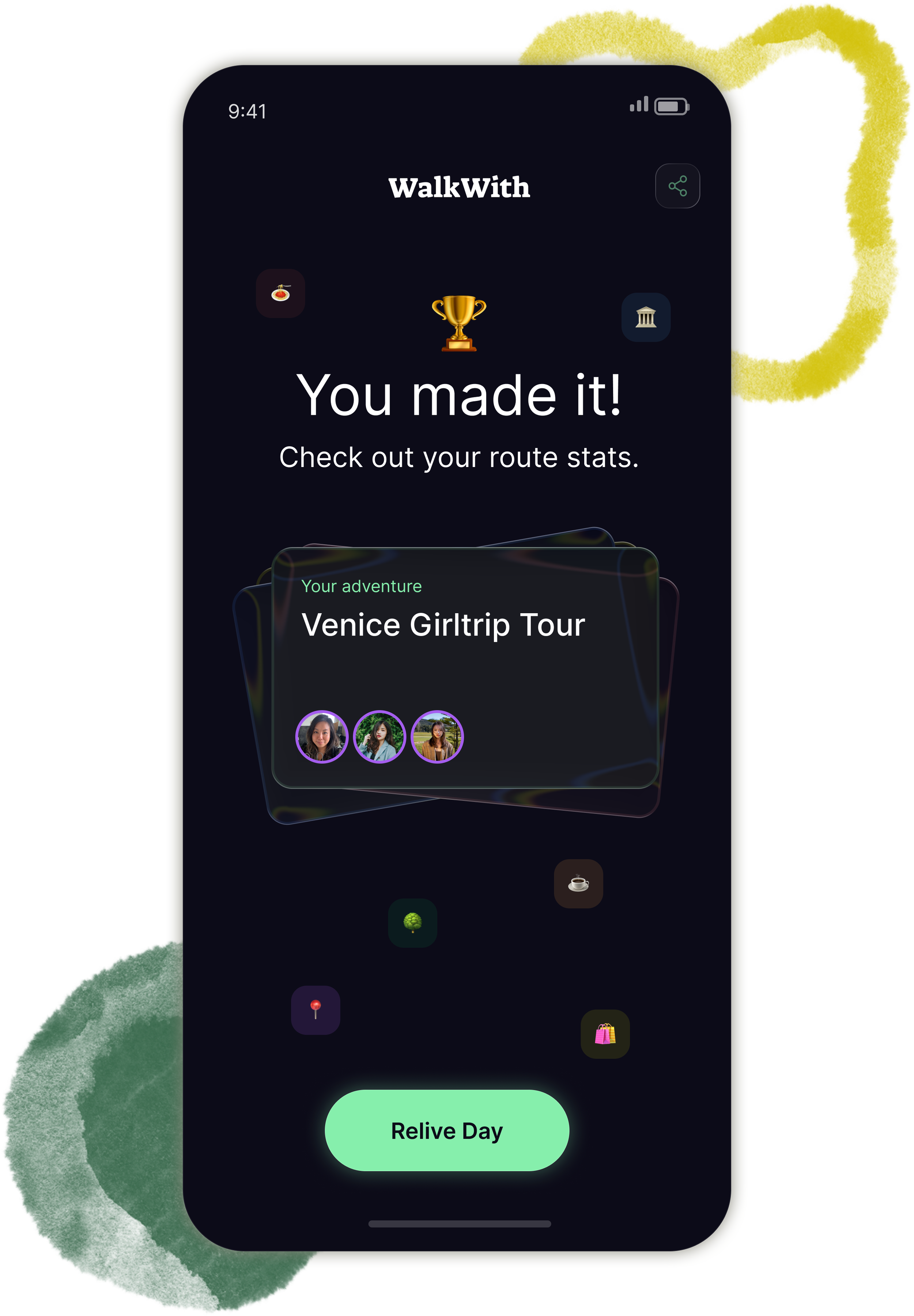
Phase D • Achievement & Memory
After every trip, I forget what we actually did. Too many stops, too many days. The details disappear. I end up scrolling through someone else's Reels to piece together my own experience.
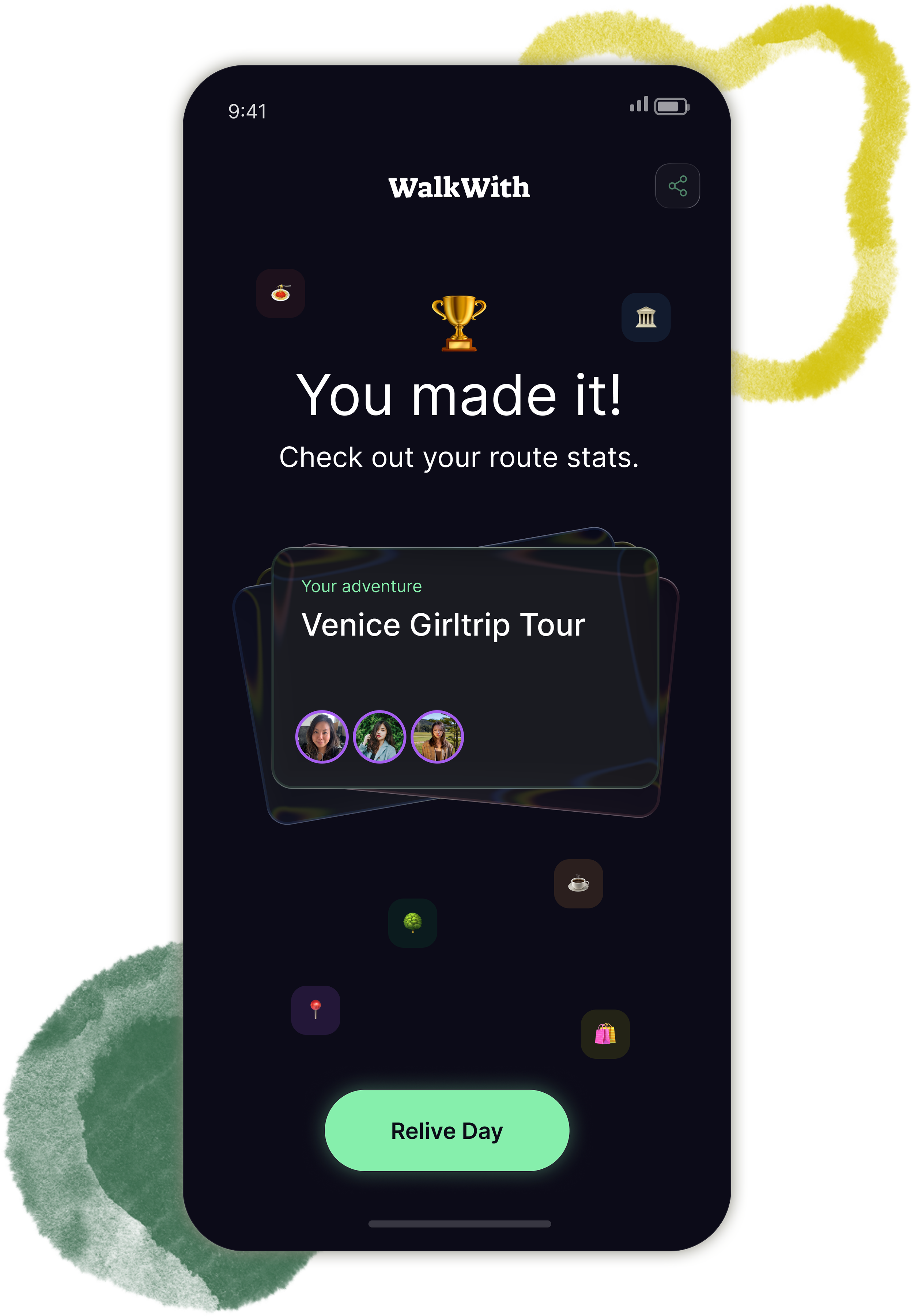
When GPS registers that the group has reached the final destination (back to Hotel), WalkWith prompts everyone to reveal their day. Nothing is shown upfront. The design creates the same pull as a Spotify Wrapped moment: You want to tap before you see what's inside.
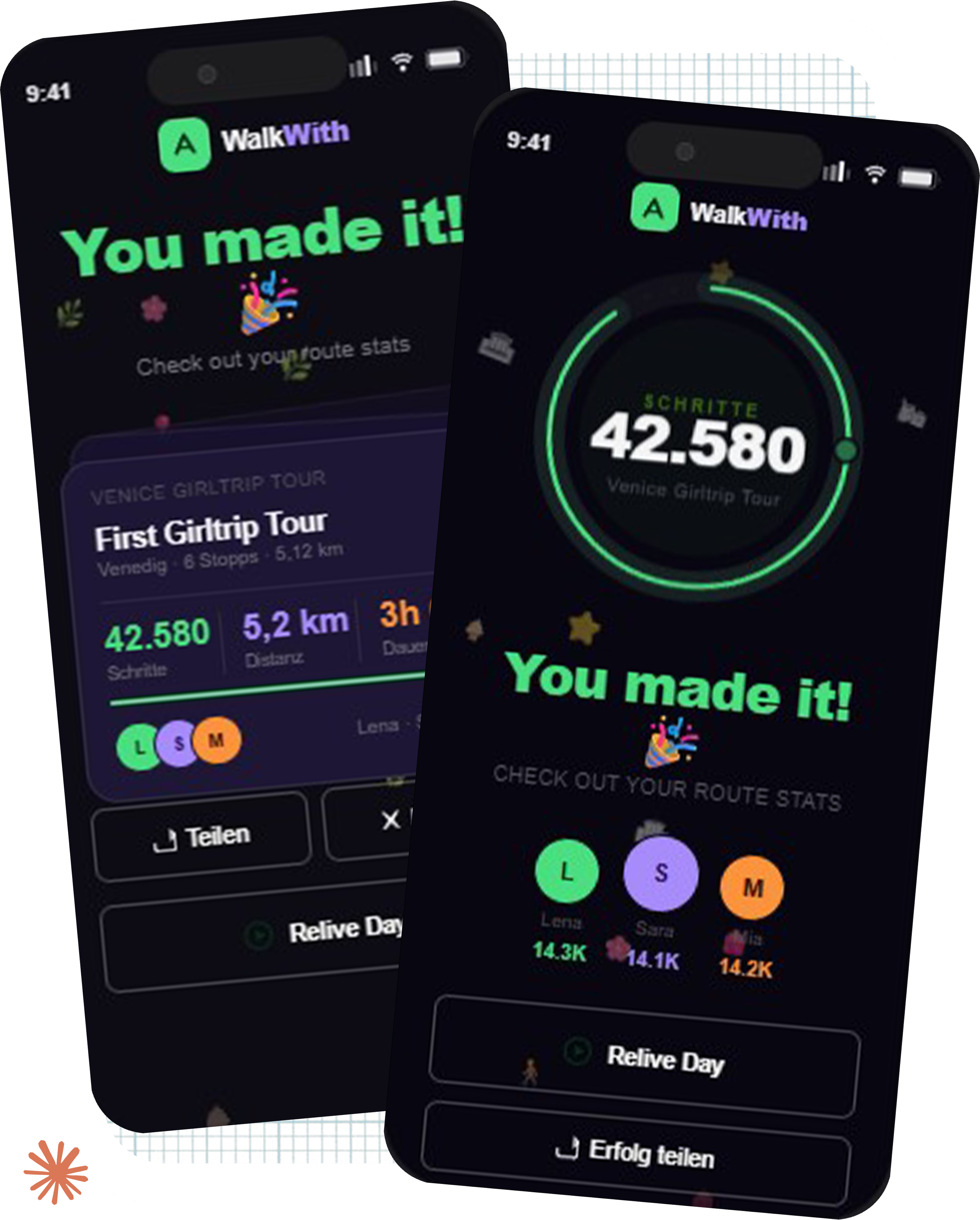
Once revealed, the trip diary combines GPS data, uploaded group photos, timestamps and highlights into a shareable memory. The group can add photos immediately or upload them later. The result is something you'd actually want to send. Not a data export. A story.
AI in My Process
AI gave me fragments to react to. Knowing which fragments to keep and which to fix is the actual work.
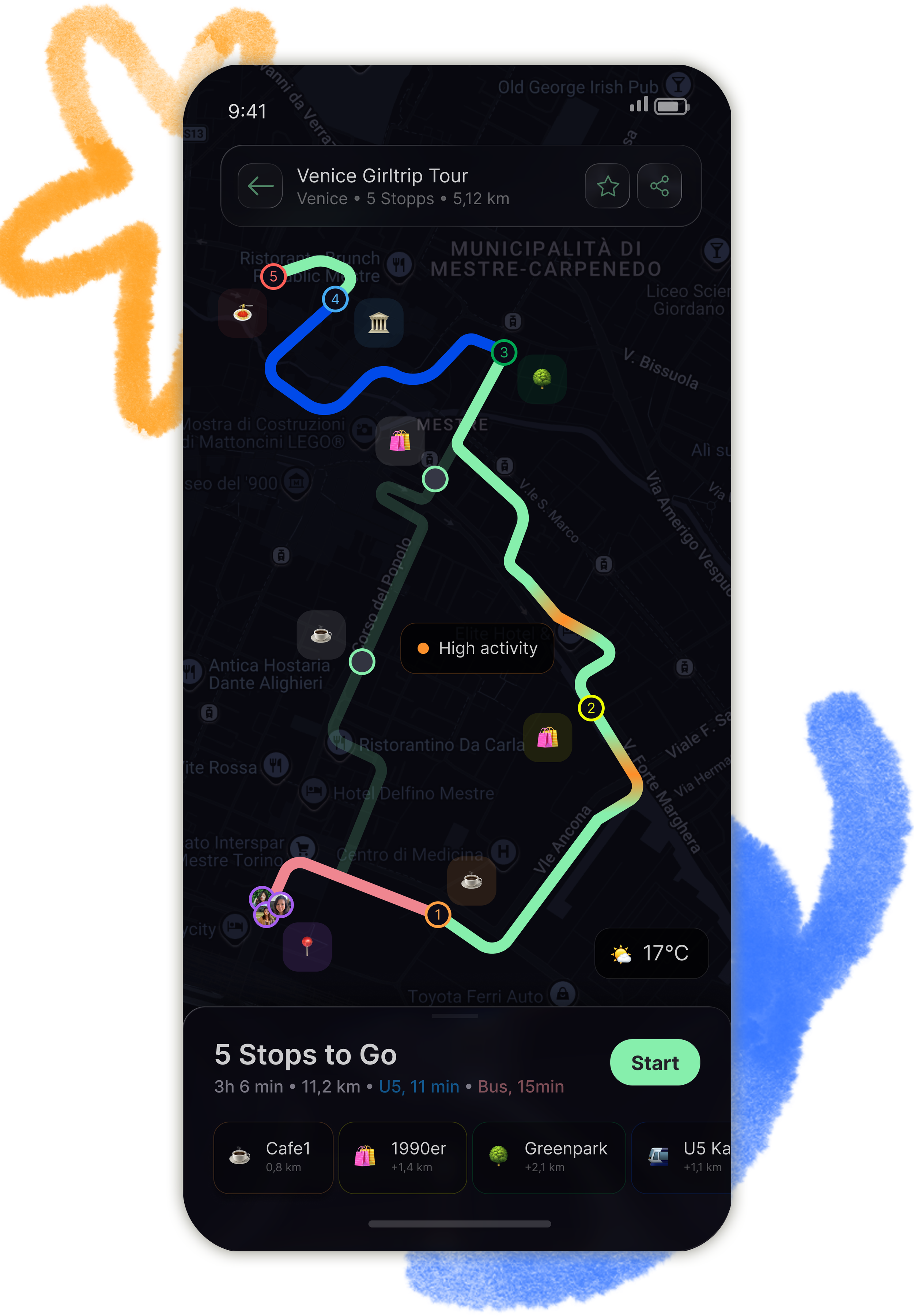
Route Guide
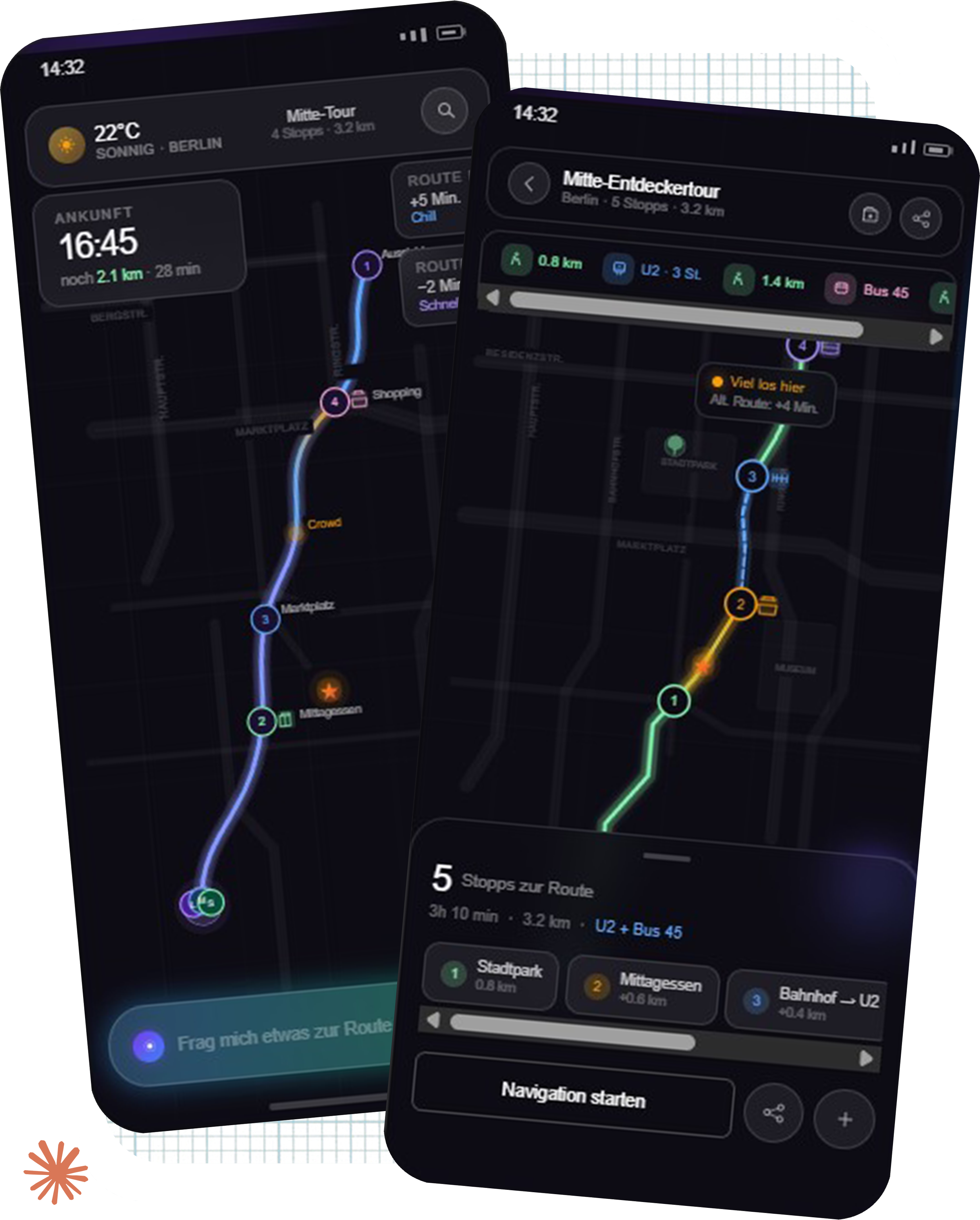
The AI output centered weather information at the top of the screen. Weather is secondary information: Useful as context, not as the first thing you see while navigating in motion. I moved it to the bottom right and rebuilt the hierarchy around what matters when you're moving: Direction, distance, next stop.
The final version took two prompt iterations before I had enough structure to finish in Figma.
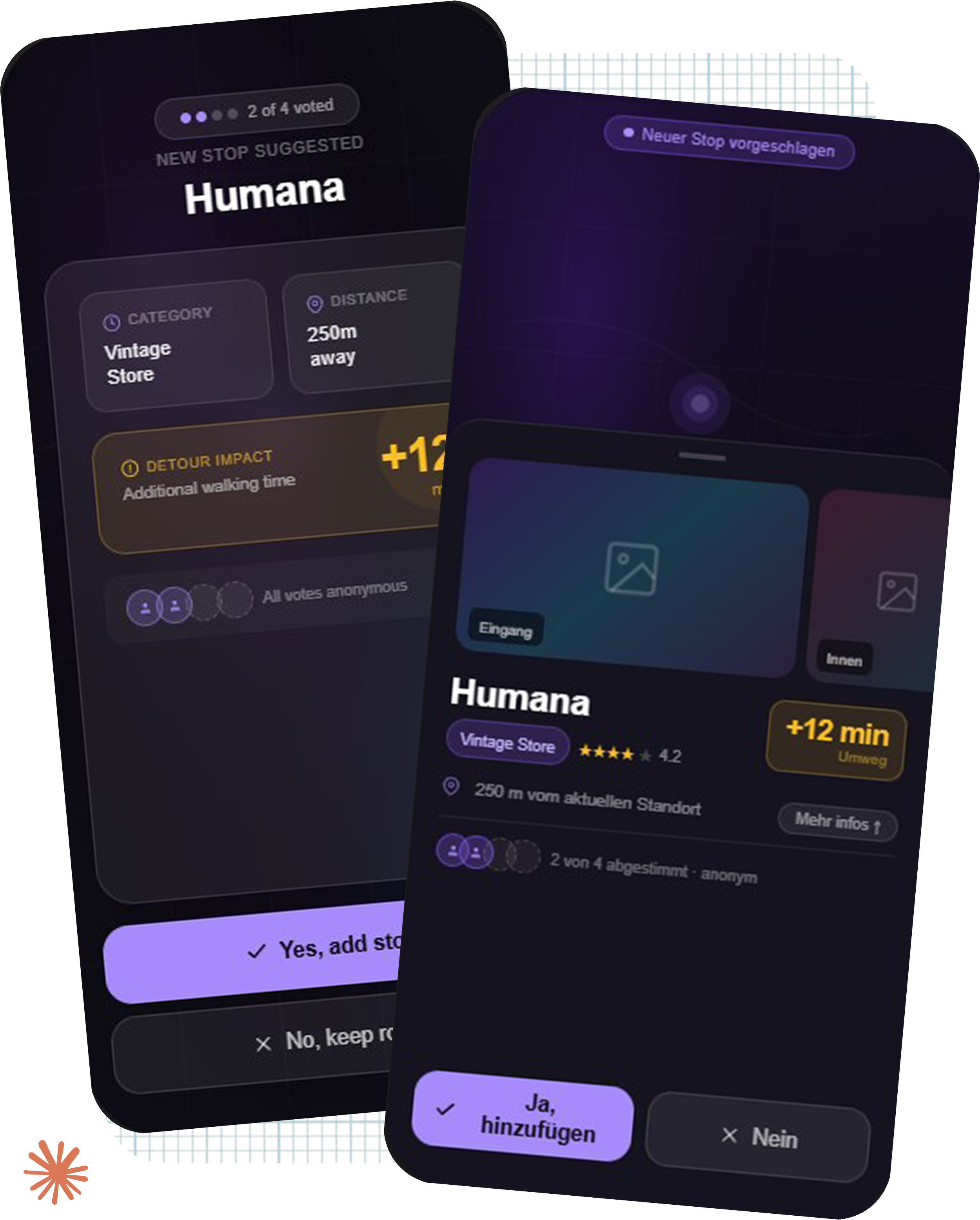
Anonymous Voting
The AI produced a single-card layout. In a group with multiple simultaneous proposals, a single card hides the problem: you don't know how many ideas are on the table. I restructured around a swipeable stack format so the group could see the volume of options and move through them quickly. The Tinder reference wasn't an aesthetic choice. It was a decision about how fast a group needs to reach consensus when they're standing on a street corner.
Achievement
The AI showed all statistics and trip information upfront. I removed everything. Nothing is visible until you tap. The reveal is the moment. Showing the data before the tap kills it.
-
The Transit-Pivot came from Japan and feet that gave out after too many kilometers. Anonymous Voting came from watching one loud person override a group of ten. The tagging system came from a sister whose dietary needs kept getting forgotten. Battery Handoff came from realizing that automatic role assignment creates new social problems instead of solving old ones.
Good product thinking doesn't start with frameworks. It starts with noticing what breaks and asking why.
-
The design work felt like a sprint. AI could take a rough brief and return a layout within minutes. But it returned fragments: Structurally plausible, contextually wrong. Knowing which rule to apply to fix each one is not something AI could do. That knowledge came from real trips, real friction, real moments where the plan collapsed.
-
The second prompt always produced better results than the first. Not because AI improved, but because articulating what was wrong with the first output forced more precision about what was actually needed. Prompt engineering turned out to be problem articulation. That is a transferable skill.
-
The design process was fast. Explaining why each decision was right took much longer, because the thinking happened quickly and intuitively. That gap between doing and explaining is something worth closing earlier in future projects.
Learnings
Closing
I was the one staring at my phone while my sisters were looking at the city.
WalkWith exists so that the next time someone plans a trip for the people they love, they can put their phone away.
Good design doesn't replace human judgment. It creates the conditions for it. Every feature in this system is built around one question: What needs to work so that the person navigating can stop thinking about navigation?
AI helped me move faster. But the decisions that made it real came from broken moments on real trips, with real people who trusted me to figure it out.